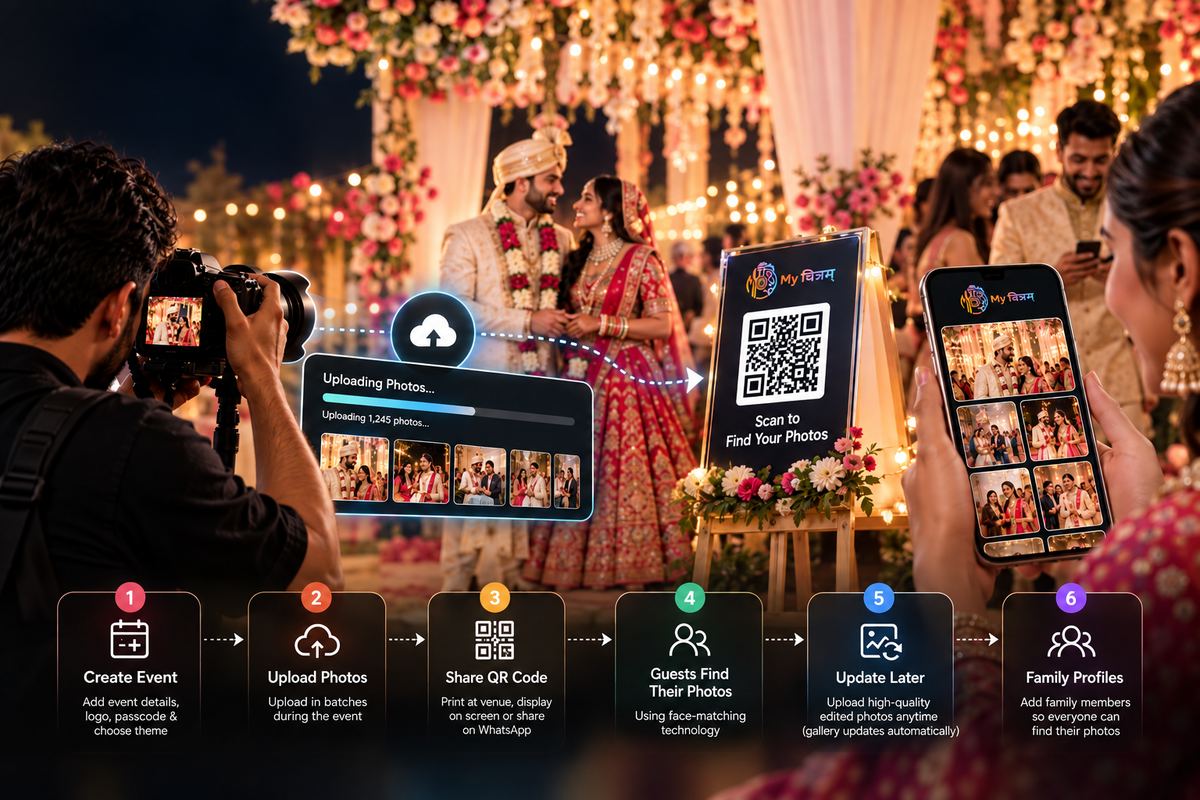
Wedding photography is time-sensitive- couples and guests want their photos fast, but quality takes time. My Chitram lets you deliver personalised galleries to every guest the same day, without sacrificing quality control. Here's how to run it smoothly.
Before the wedding: set up your event
Log in to My Chitram and create a new event. Name it clearly (e.g. "Sharma Wedding- 28 Sep 2026"). Set a passcode that matches what you'll share with guests. Upload your studio logo for watermarking. Choose your gallery theme.
Print the event QR code- you'll use it at the venue.
During the ceremony: upload as you shoot
You don't need to wait until the end of the day. Upload your first batch after the ceremony. Guests at the reception can already start finding their photos while the evening programme is still going.
Tip: assign an assistant to handle uploads throughout the day while you focus on shooting. They can upload batches over the venue Wi-Fi in the background.
Placing the QR code
Put the QR code in at least three places:
- Table cards at each reception table
- Screen projection between programmes on the main display
- Post-event WhatsApp message sent to the wedding group by the family
After the wedding: quality review
My Chitram doesn't replace your editing workflow- it handles delivery. You can continue editing and re-uploading higher-quality versions. The platform replaces old files automatically, and guests' galleries update with the improved photos.
Handling the family group (multiple profiles)
One of the most useful features for weddings: a guest can add their family members as profiles. Grandma who doesn't have a smartphone? Her son can add her face from his account and download her photos for her. This dramatically improves reach for older guests.
What to tell the couple
Tell them My Chitram means guests can find their photos the same night. This is a selling point in your proposal- it adds perceived value to your package without significantly increasing your workload.